
FieldLedger · Construction & Personnel
Run every site, crew and peso from one ledger.
Construction & personnel management built for contractors – from mobilization to final billing.
Built for Philippine contractors. Peso-native from day one. A web app that runs in your browser.
- ProjectsBudgets, progress and live cost-to-date per site.
- Crew payrollAttendance-based pay, overtime, allowances and loans.
- ExpensesRequest, approve and pay with a full audit trail.
- MaterialsEstimate vs. delivered vs. used, per work item.
FieldLedger by Novastack Technologies Inc.
- ₱ peso-native
- SSS · PhilHealth · Pag-IBIG
- Semi-monthly payroll
- Role-based access
- HTTPS secured
Why FieldLedger
Construction project management for Philippine contractors, in one ledger
Philippine contractors juggle parallel sites with separate budgets, crew pay that depends on attendance and overtime, materials that move from estimate to delivery to use, expenses that need approval before they hit the books, and payroll deductions on a semi-monthly cycle. Spreadsheets and disconnected tools make cost-to-date, variance and audit trails hard to trust.
FieldLedger puts all of it in one ledger, so the number on the project page is the same number in the report.
-
Parallel projects
Run multiple sites in parallel with live budget, labor and material costs.
-
Crew payroll
Attendance-based crew payroll with overtime, recurring allowances, contributions and loan deductions.
-
Expense control
Record, approve and pay project and overhead expenses. Approved and paid items count toward project cost.
-
Bill of materials
Estimate vs. delivered vs. used per work item. Record deliveries, site usage and returns.
Everything in one place
Five areas in the app's navigation, one set of numbers underneath.
-
Operations
- Dashboard
- Projects
- Materials
- Expenses
- Incidents
-
Workforce
- Employees
- Attendance
- Payroll
-
Finance
- Billing
- Petty cash
-
Insights
- Reports
-
Administration
- Users
- Settings
Projects & Dashboard
Construction project management with live cost-to-date
Run multiple sites in parallel with live budget, labor and material costs.
Every job in one place, from contract to close-out
- Create and edit projects with contract value, budget, start and target dates, client, location and status: Planning, Active, On Hold, Completed or Cancelled.
- Required fields, negative amounts and a target date earlier than the start date are caught before you save.
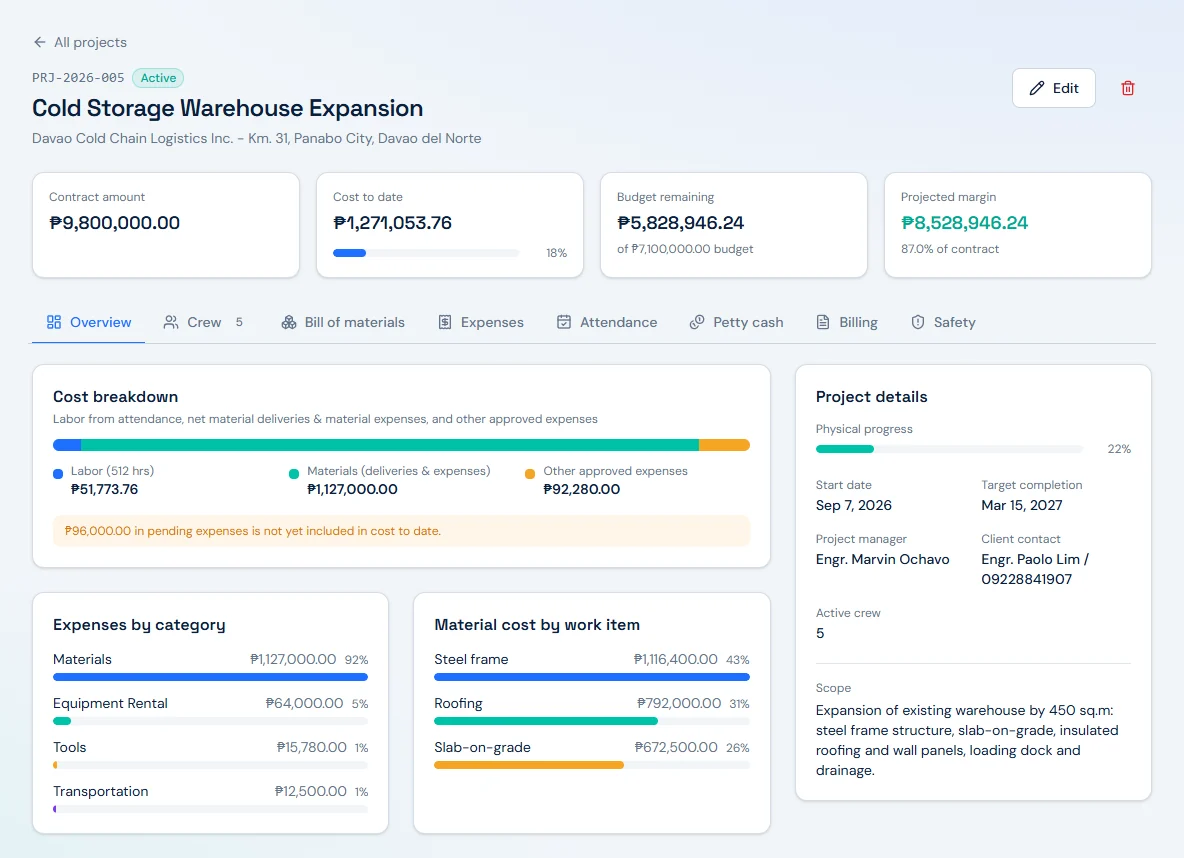
- Open a project and the header shows contract, cost to date, budget remaining and projected margin at a glance.
- Every project has its own tabs for Overview, Crew, Bill of materials, Expenses, Attendance, Petty cash, Billing and Safety, so the whole job lives in one place.
- Live cost-to-date is broken into labor, materials and other expenses, with margin and budget used calculated against the contract and budget. Pending expenses are called out separately until they are approved.
- The project page and the project cost report show the same figures, so the site team and the office are reading the same number.
- Engineers (and Managers, when project scoping is turned on) see only the projects they are assigned to.
A portfolio view and a dashboard that start the day
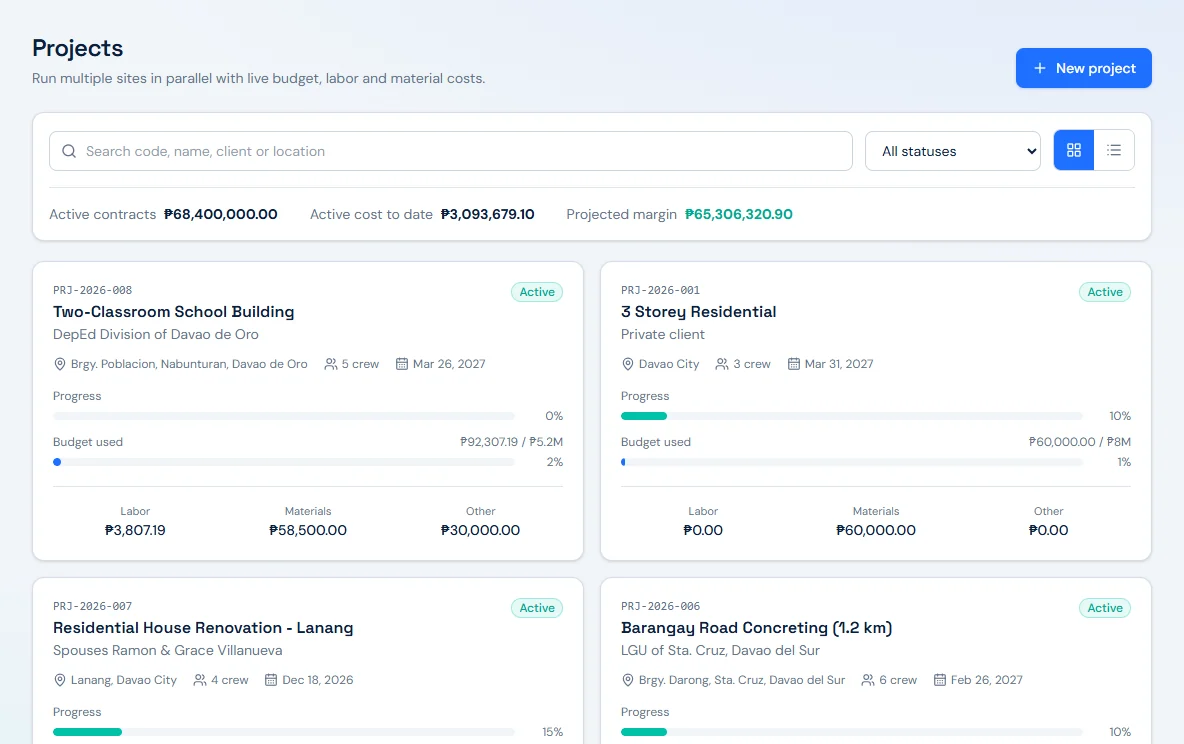
- See every active site on one portfolio view: active contracts, active cost to date and projected margin.
- Each project card shows its code, client, location, crew count, target date, progress, budget used, and labor, materials and other costs. Search and filter when the list grows.
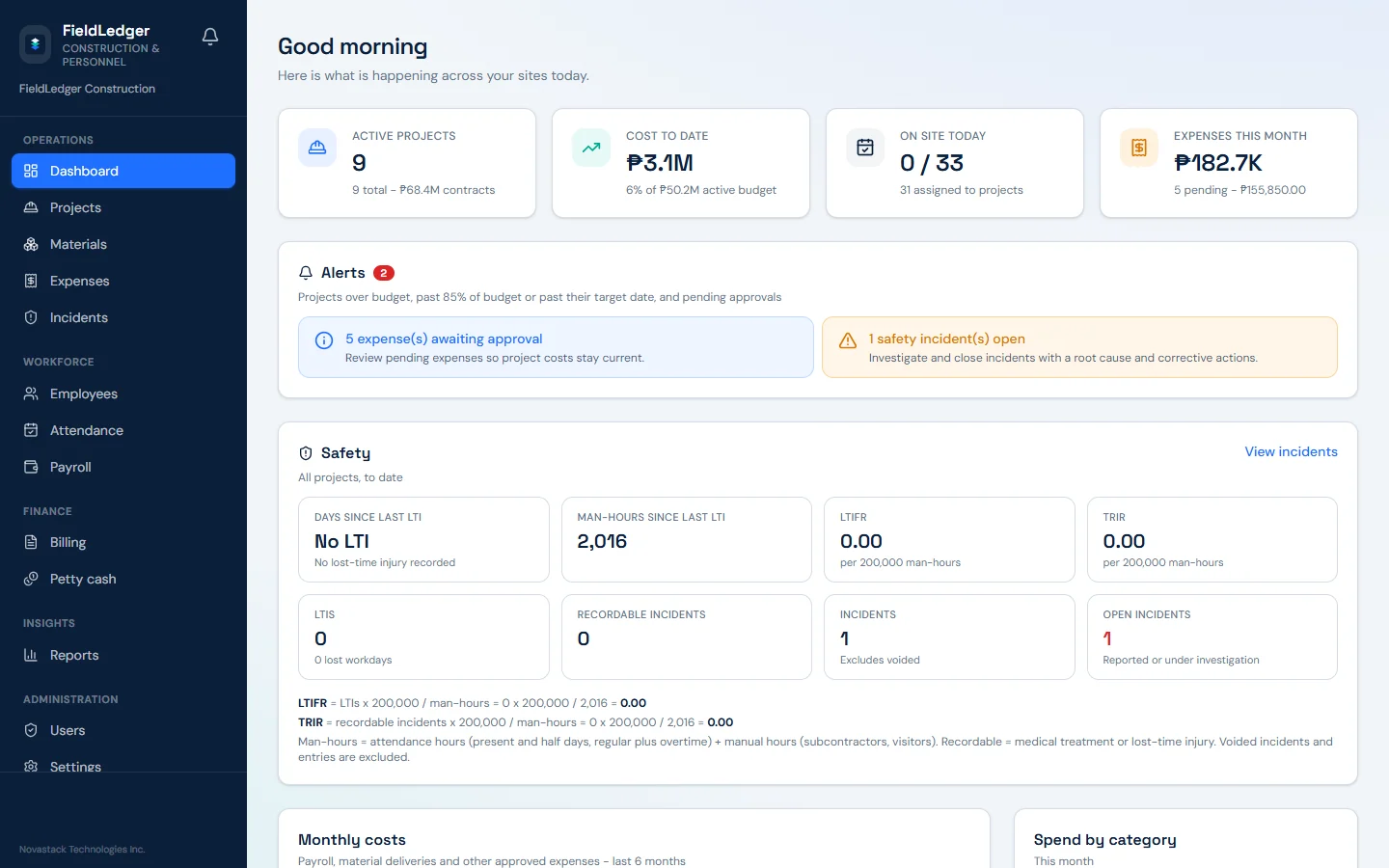
- The Dashboard opens with a daily greeting:
Here is what is happening across your sites today.
- Headline KPIs: active projects with total contract value in ₱, cost to date in ₱ and as a percentage of active budget, who is on site today (present versus assigned), and expenses this month with pending items and amounts.
- An alerts panel designed to flag projects over budget, past 85% of budget or past their target date, together with expenses awaiting approval and open safety incidents.
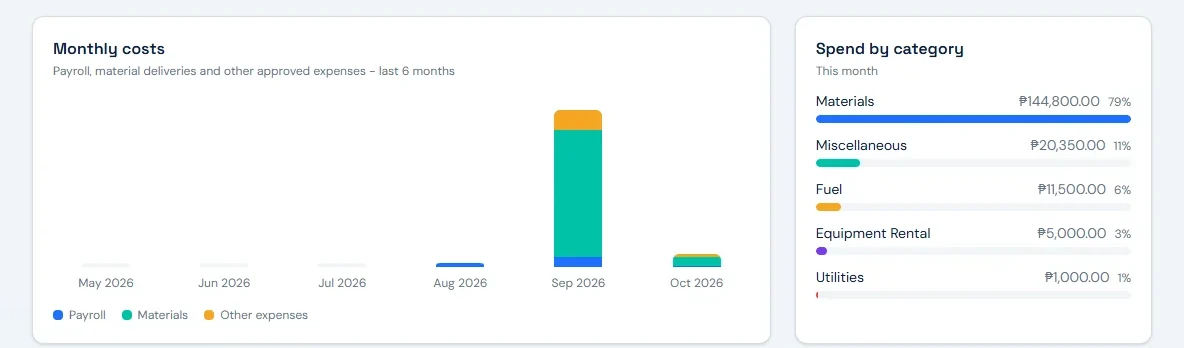
- Monthly costs for payroll, materials and other spend over six months, spend by category, and a payroll card with gross this month and the last net payout.
Crew, attendance & payroll
Crew payroll that starts from the daily time record
Attendance-based crew payroll with overtime, recurring allowances, contributions and loan deductions.
Employees
Crew, staff and engineers with their rates, contacts and current project assignments.
- Employee numbers are generated automatically.
- Daily and hourly rates, including the common Philippine crew pattern of a daily rate with overtime derived from it.
- Crew roles such as Crew, Worker, Foreman, Operator and Driver, with +63 contact numbers and per-employee pay items.
- Assign one worker to more than one project; released assignments stay in the history.
- Future hire dates are rejected, and the app warns you when a new employee's name matches an existing one.
Attendance
Daily time records per worker and project. Labor cost rolls up to the project the day was logged against.
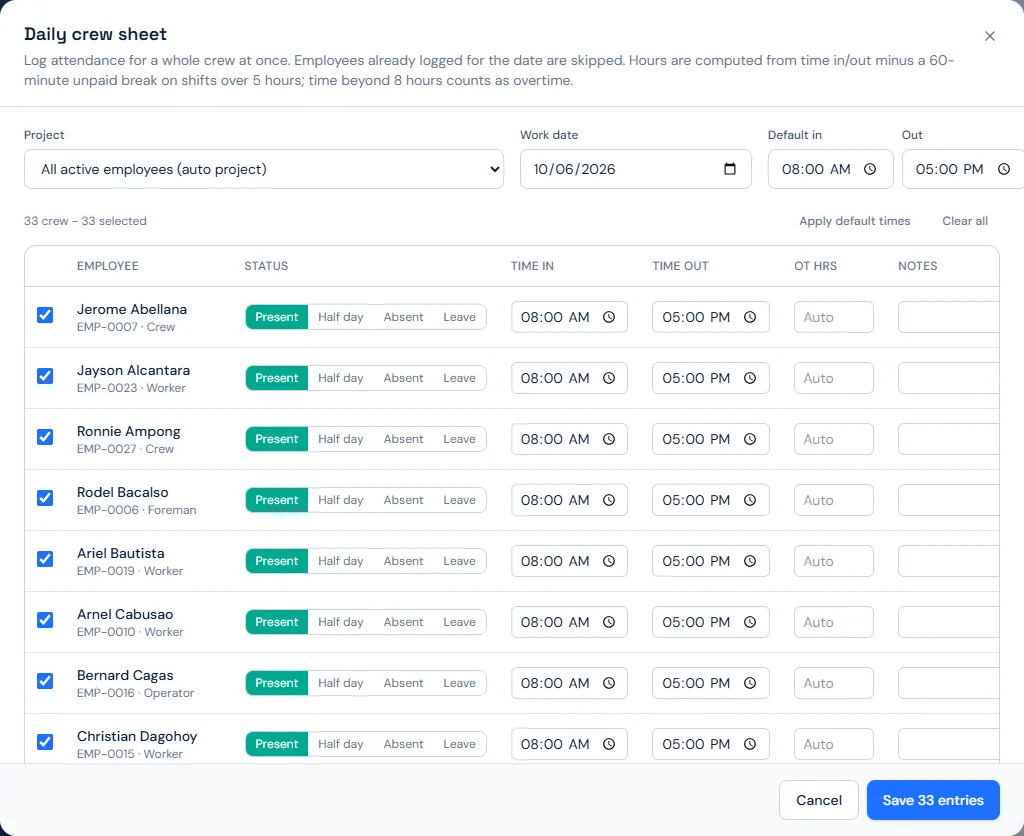
- Two ways to log: a Crew sheet for a whole crew's day at once, and Log entry for a single record.
- Statuses: Present, Absent, Leave and Half day.
- Overtime is counted after the standard regular hours, with the unpaid meal break accounted for, and paid at the overtime multiplier you set (1.25× by default).
- Common mistakes are blocked: reversed clock times, duplicate days, the same worker double-booked across two sites, future dates, and "present" with no clock times.
- Leave and absent days are not charged to project labor.
- Filter by worker and date, and pull an attendance summary of present, absent and leave counts.
Semi-monthly payroll, straight from attendance
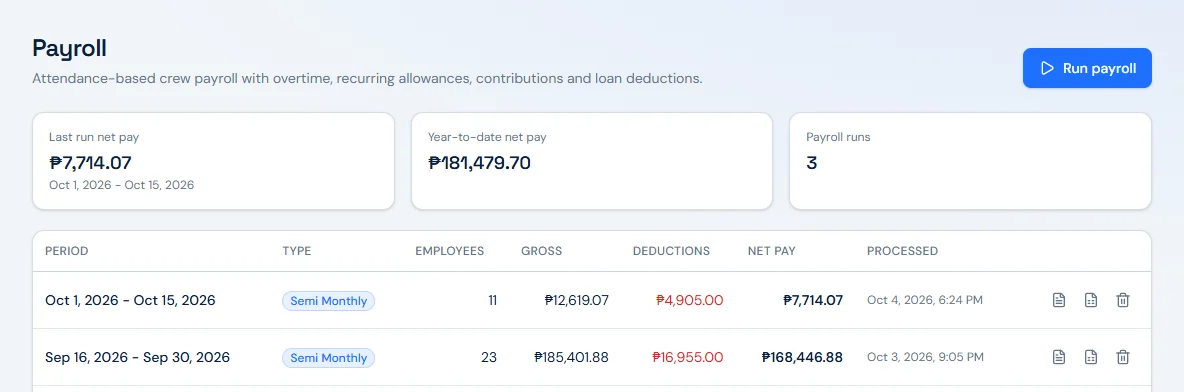
- Semi-monthly payroll runs, for example the 1st to the 15th and the 16th to month-end. Weekly and monthly periods are available too.
- Gross pay is built from attendance, including overtime at your configured multiplier.
- SSS, PhilHealth and Pag-IBIG are taken once a month, in the payroll that closes the month, and prorated by days worked.
- The payroll register shows separate deduction columns for cash advance, Pag-IBIG, PhilHealth, SSS and SSS loan, plus a pay type column and a totals row.
- Payslip PDFs match the register line by line, with the full deduction breakdown on each payslip.
- Net pay never goes below ₱0.
- Export the register to CSV, named by period end.
- The payroll overview shows last run net, year-to-date net and run count. Every run records the period, pay type, employee count, gross, deductions, net, and who processed it and when.
Company payroll rules
Set once in Settings, shown on payslips and used for overtime and labor costing:
- Standard hours per day.
- Overtime multiplier (for example, 1.25).
- Unpaid meal break deducted from work spans over five hours.
- Whether half days can earn overtime.
- Work days per month used to prorate SSS, PhilHealth and Pag-IBIG: 26 for a Monday-to-Saturday crew or 22 for Monday to Friday, so one day of 26 carries 1/26 of the monthly amount.
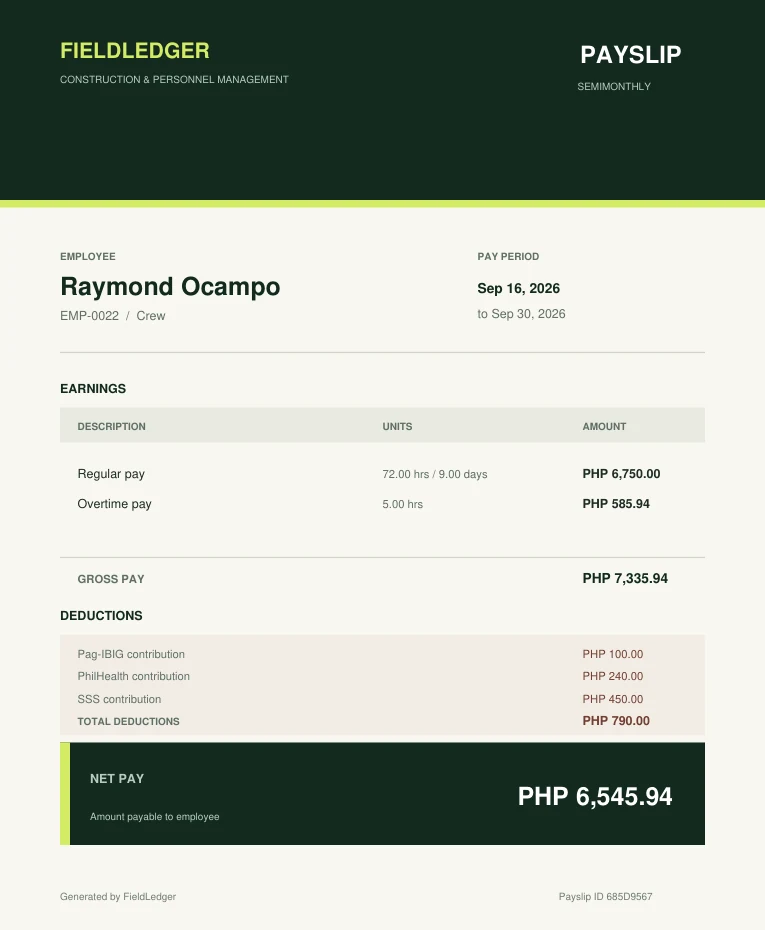
See the math: this payslip
- 9 days × ₱750.00 daily rate
- ₱6,750.00
- Hourly rate: ₱750.00 ÷ 8 hrs
- ₱93.75
- 5 OT hrs × ₱93.75 × 1.25
- ₱585.94
- Gross pay
- ₱7,335.94
- Pag-IBIG + PhilHealth + SSS
- (₱790.00)
- Net pay
- ₱6,545.94
Expenses & petty cash
Expense approvals and petty cash that keep project cost honest
Record, approve and pay project and overhead expenses. Approved and paid items count toward project cost.
Expenses: request, approve, pay
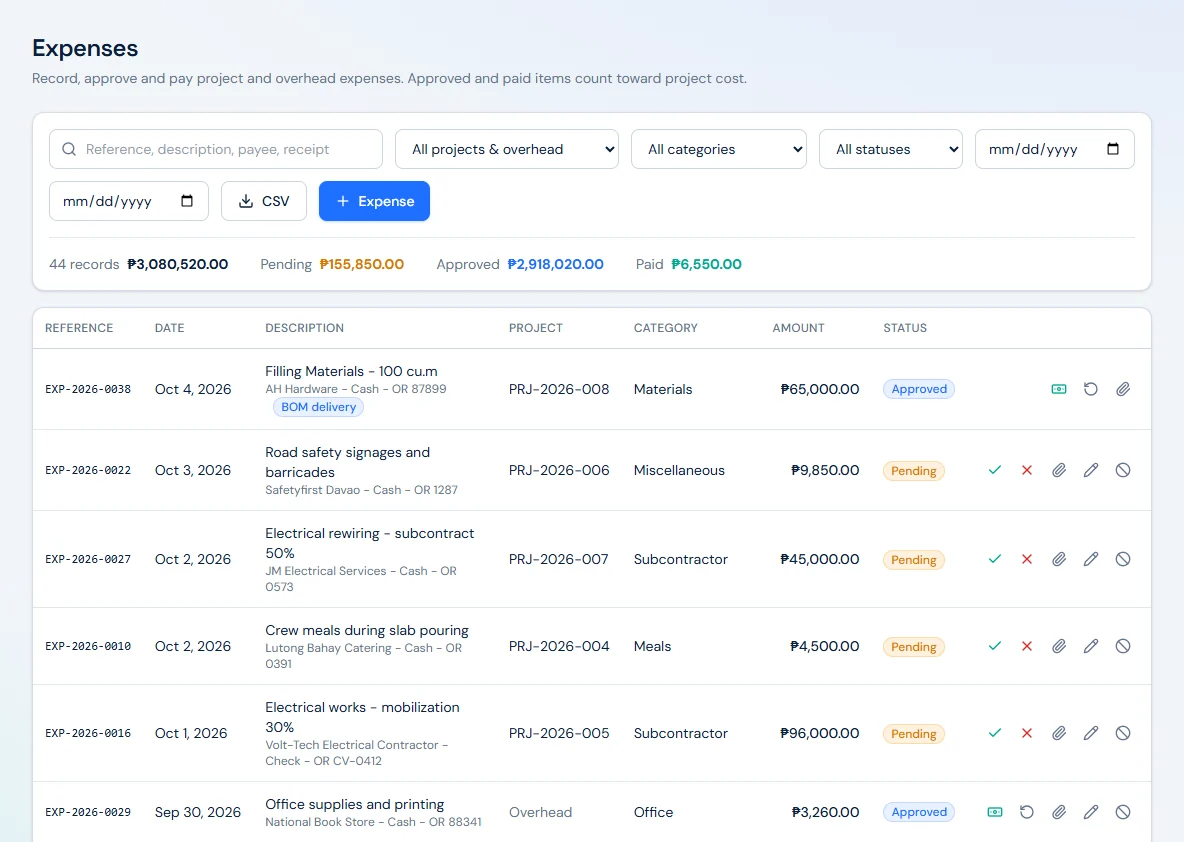
- A full flow from request to approval to payment, with reject and void when needed.
- Pending expenses do not touch project cost until they are approved.
- The approver's name and the time of approval are recorded on every approval.
- Paid expenses are locked and cannot be reverted to an earlier status.
- Overhead expenses can be kept off every project with the company overhead option.
- Categories built for construction: Materials, Subcontractor, Equipment Rental, Fuel, Transportation, Permits, Utilities, Tools, Meals, Office and Miscellaneous.
- Record the payment mode and the OR number, and see the source of each item, such as Petty cash or BOM delivery.
- Expenses created from a material delivery are not double-counted against the project.
- Expense dates cannot be later than today.
- Filter the list and export to CSV. The dashboard shows how many expenses are waiting for approval.
- Voided expenses keep their document numbers, so the numbering has no gaps.
Expense status flow
- Pending
- Approved
- Paid
Side exits: Rejected Voided · Only approved and paid items count toward project cost.
Petty cash
Head-office and project cash funds, advances, liquidations and replenishments.
- Run head-office and project-level cash funds, each with its own reference number.
- Disbursements and liquidations create pending cash expenses. Only the approved expense counts toward project cost, never the cash movement itself.
- Track open cash advances through liquidation or return.
- Replenishments follow a clear chain: the custodian requests, a different approver approves, and Finance releases the cash.
- Voided ledger entries are kept for the audit trail.
Replenishment, with separation of duties
Three people, three steps, recorded in the fund's ledger.
- Custodianrequests a replenishment for the fund
- A different approverapproves the request
- Financereleases the cash
How a disbursement reaches project cost
- Disbursement
- Pending cash expense
- Approved, in project cost
Bill of materials
Bill of materials: estimate vs. delivered vs. used
Estimate vs. delivered vs. used per work item. Record deliveries, site usage and returns.
Materials catalog
Standard materials and default unit costs used when building project bills of materials.
- Organize materials by category, for example Cement & Aggregates, Electrical, Formworks & Lumber, Masonry, Paint & Finishes, Plumbing, Roofing, and Steel & Rebar.
- Units such as cu.m, bag, pc and set. Item descriptions can follow the way your estimates are written, for example DPWH-style item descriptions.
- Duplicate material codes are blocked.
Project BOM
- Each project's BOM shows estimated quantity, delivered, used, on site, to procure, estimated cost, actual cost and variance.
- Record three kinds of movement: delivery, site usage and return, each linked to expenses.
- Recording a delivery automatically creates a payment request, so procurement is not entered twice.
- The BOM blocks using more than what is on site, negative quantities, and returning more than was delivered.
- Variance is labeled in pesos as under estimate or over estimate.
- See material cost by work item on the project overview.
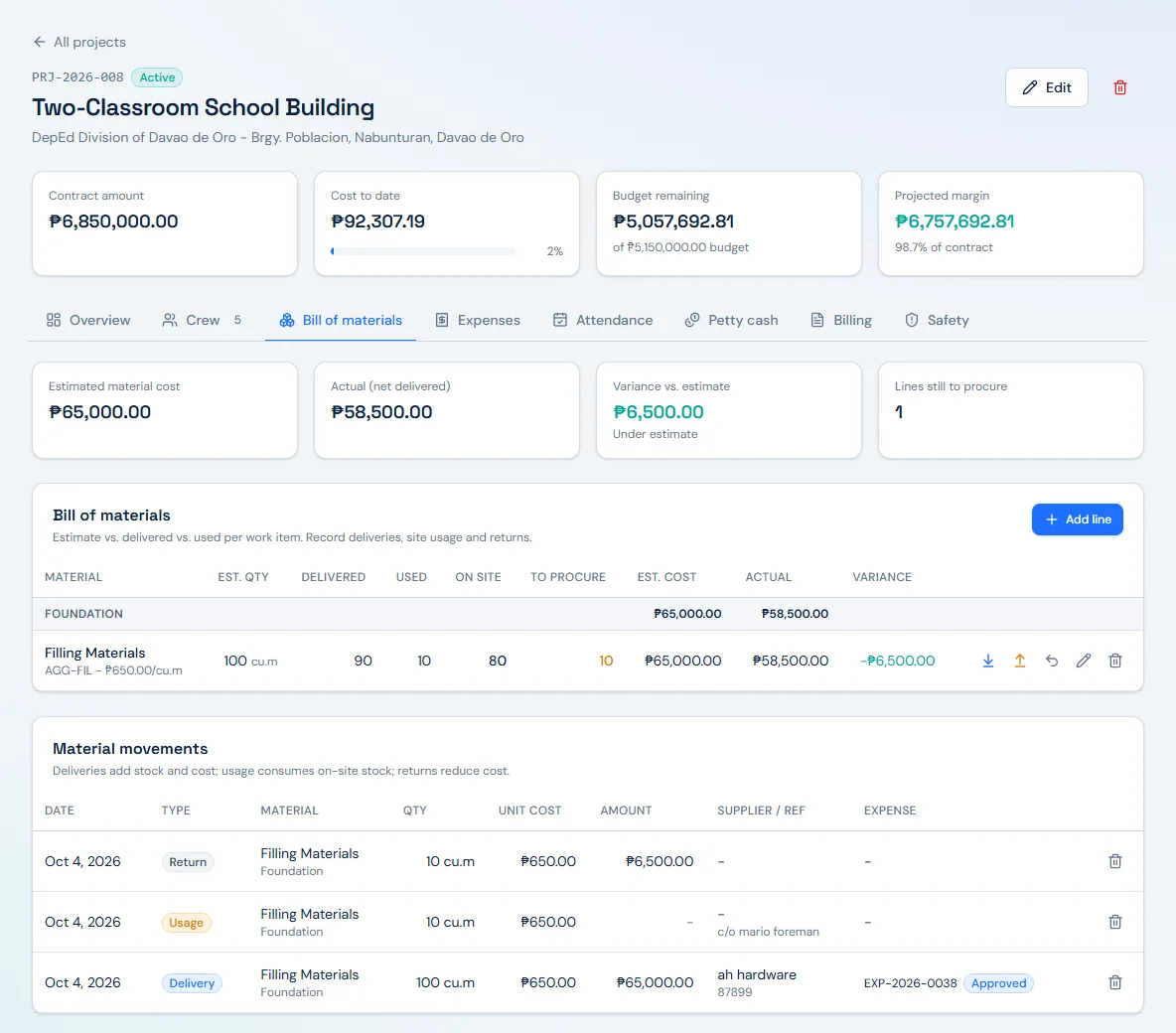
See the math: the Filling Materials line above
- Estimated: 100 cu.m × ₱650.00
- ₱65,000.00
- Delivered 100 − returned 10 = net delivered
- 90 cu.m
- Net delivered 90 − used 10 = on site
- 80 cu.m
- Estimated 100 − net delivered 90 = to procure
- 10 cu.m
- Actual: 90 cu.m × ₱650.00
- ₱58,500.00
- Variance vs. estimate
- ₱6,500.00 under estimate
Billing & safety
Progress billing and construction safety, tracked per project
Progress billings, approvals and collections across projects.
Progress billing
- Progress billing documents with their own numbering and a full status flow: Draft, Submitted, Approved, Rejected, Sent, Partially Paid, Paid and Voided.
- Each project's Billing tab shows accomplished, billed to date (net), collected, receivable, overdue, unbilled balance and retention held.
- Start with the downpayment, then bill progress by percent complete.
- Each progress billing applies retention and withholding to compute the net receivable.
- Billing terms start from Philippine-practice defaults in your company settings and can be edited per project: a downpayment percentage recouped proportionally from progress billings, retention held from each progress billing and released at completion, 12% VAT, and expanded withholding tax (EWT), the creditable withholding by the client covered by BIR Form 2307. Example defaults are 15% downpayment, 10% retention and 2% EWT, all configurable.
- Change orders are handled: a deductive change order cannot reduce the contract below what has already been billed, and total billings cannot exceed the revised contract.
- Billing does not inflate project cost-to-date, so your margin stays honest.
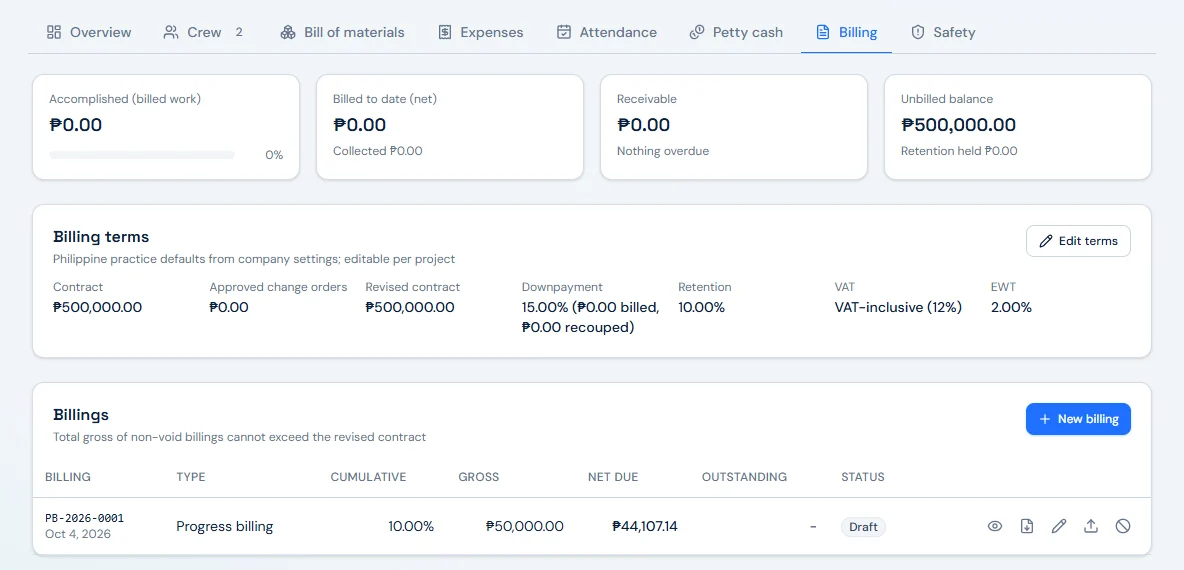
See the math: billing PB-2026-0001 above
- Gross: 10% of ₱500,000.00 contract (VAT-inclusive)
- ₱50,000.00
- VAT-exclusive base: ₱50,000.00 ÷ 1.12 (12% VAT)
- ₱44,642.86
- Less retention, 10% of gross
- (₱5,000.00)
- Less EWT, 2% of VAT-exclusive base (BIR 2307)
- (₱892.86)
- Net due
- ₱44,107.14
Safety and incidents
Safety incidents, near misses and their corrective actions on your projects.
- Incidents is a top-level module, with a Safety tab on every project.
- Incident types: Near miss, First aid, Medical treatment, Lost-time injury (LTI), Property damage, Environmental and Other.
- Severities: Low, Moderate, High and Critical. Statuses: Reported, Under Investigation, Closed and Voided.
- Track open actions and corrective actions per incident.
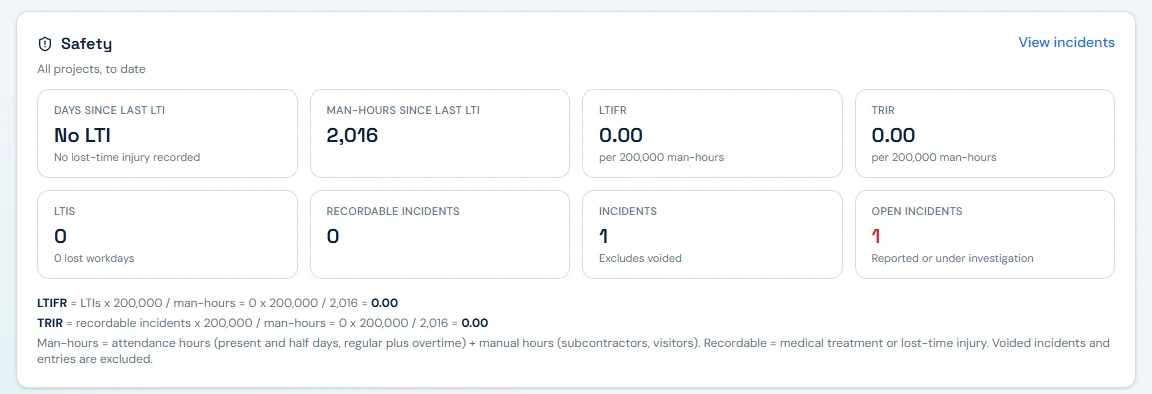
- The dashboard safety panel shows days since last LTI, man-hours since last LTI, LTIFR, TRIR (per 200,000 man-hours), LTIS, recordable incidents, total incidents and open incidents, with the formulas shown.
- Man-hours come from attendance, and you can add manual man-hours for subcontractors and visitors.
- Open incidents raise a dashboard alert, and project safety data exports to CSV.
Philippine payroll & billing
Peso-native, PH-ready.
Philippine crew payroll and progress billing practice, built into the same ledger as your projects.
₱ throughout
Philippine peso (₱) throughout the app, reports and exports.
SSS, PhilHealth, Pag-IBIG
Separate deduction columns on the register and on every payslip.
Cash advances & SSS loans
Tracked per worker and deducted on payroll runs.
Semi-monthly payroll
Semi-monthly pay periods, for example the 1st to the 15th.
Daily-rate crews
For example ₱650 per day, with hourly overtime derived from the rate.
Contribution proration
By work days per month (26 or 22), set once in company settings and taken in the run that closes the month.
Progress billing defaults
Downpayment recoupment, retention, 12% VAT and EWT (BIR 2307) defaults that match Philippine practice and stay editable per project.
Easier reconciliation
Payslip deduction breakdowns and register columns that make remittance reconciliation easier.
FieldLedger shows contributions and deductions on the register and payslips. Remittances to SSS, PhilHealth and Pag-IBIG, and filings with BIR, stay with your team. Billing percentages are company defaults you can edit per project.
Roles & security
Role-based access for the owner, the office and the site
Six roles, each seeing only what the job needs.
Admin
Full access, users, settings and deletions.
Owner
Sees every figure and approves in every flow; no users, settings or deletions.
HR
Employees, attendance and payroll, without contract, budget or cost figures.
Manager
Projects, crew assignments, approvals and reports.
Accountant
Expenses, approvals, payroll and finance reports.
Engineer
Assigned projects only: site attendance, BOM and material movements, and expense requests.
Security, kept simple and factual
- Engineers can submit expenses but cannot approve them, and every approver is named on the approval record.
- Restricted modules are blocked even on direct URL access, not just hidden from the menu.
- HTTPS is enforced across the app.
- User-entered text is displayed safely as plain text.
- Signing out clears the session, so pressing Back does not reopen the app.
- Paid expenses lock, voided records keep their numbers, and voided petty cash entries stay in the ledger for audit.
Reports & exports
Construction reports and CSV exports that match the project pages
Profitability, labor, spending and workforce insights across all projects.
Project costs
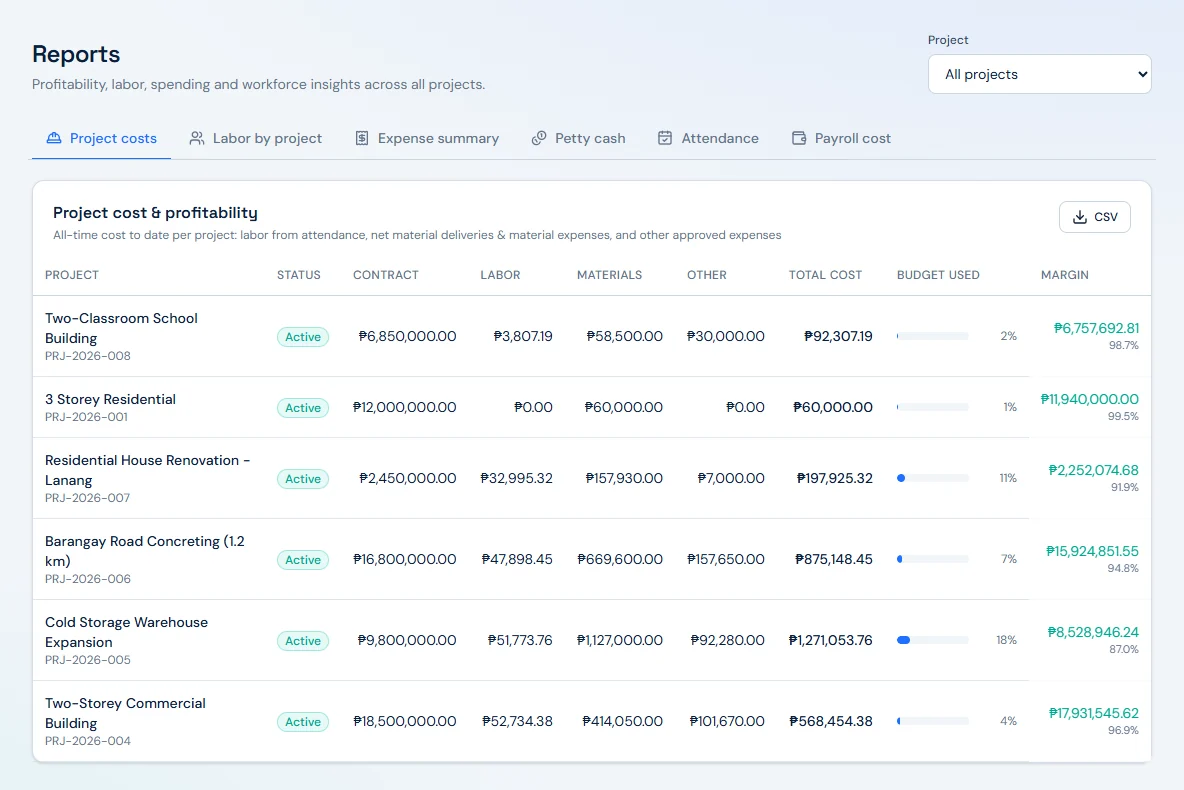
Contract, labor, materials, other, total cost, budget used and margin in pesos and percent.
Labor by project
Labor cost per project, rolled up from the days logged against each site.
Expense summary
Counts only approved and paid items.
Petty cash
Head-office and project funds, advances, liquidations and replenishments.
Attendance
Daily time records across workers and projects.
Payroll cost
Payroll runs with gross, deductions and net.
Exports your accountant can use
- Every report exports to CSV.
- Payroll produces payslip PDFs and a CSV register.
- Report figures match the project pages: the Cold Storage Warehouse Expansion row carries the same ₱1,271,053.76 cost to date and 87.0% margin shown on its project page above.
How it works
From mobilization to final billing, in six steps
Set up the project
Enter contract, budget, dates, client and location; build the bill of materials from your catalog.
Mobilize the crew
Add employees with daily or hourly rates and assign them to one or more sites.
Log the day
Record attendance by crew sheet or single entry; overtime and labor cost roll up to the right project automatically.
Control the spend
Record deliveries, site usage and returns; route expenses and petty cash through request, approval and payment.
Run payroll
Process semi-monthly payroll with SSS, PhilHealth, Pag-IBIG, cash advances and SSS loans, then issue payslip PDFs.
Bill and collect
Start with the downpayment, bill progress by percent complete with retention and withholding applied, and track collections to final billing.
FAQ
Questions Philippine contractors ask about FieldLedger
Yes. It works in pesos throughout, runs semi-monthly payroll with SSS, PhilHealth, Pag-IBIG, cash advance and SSS loan deductions, and starts progress billing from Philippine-practice defaults for downpayment, retention, VAT and EWT.
Yes. Each project has its own budget, crew, BOM, expenses, petty cash, billing and safety records. The dashboard and portfolio view show all active sites together with live cost-to-date and projected margin.
Daily time records per worker and project feed gross pay. Overtime after standard hours is paid at your configured multiplier (1.25× by default), the meal break is accounted for, and leave and absent days are not charged to project labor.
Each progress billing applies retention and withholding to compute the net receivable. Your company settings hold the default percentages, including retention released at completion and EWT covered by BIR Form 2307, and you can edit them per project.
Access depends on role. Admin, Owner, HR, Manager, Accountant and Engineer each see only what their role allows, restricted pages are blocked even by direct link, and every approval records who approved and when.
Yes. All reports export to CSV, the payroll register exports to CSV, and payslips are generated as PDFs that match the register.
Existing users can sign in at pms.novastack-inc.online. To see FieldLedger with your own projects in mind, request a demo from Novastack Technologies Inc.
Put every site, crew and peso on one ledger.
From mobilization to final billing, one set of numbers for the site, the office and the owner.